Sign up for PayPal and start accepting credit card payments instantly.

Sunday, June 27, 2010

Many iphone 4 users are complaining about numerous issues especially about the problem with the signal reception when the phone is held in the most obvious manner. Well, Steve Jobs has an apt answer, suggests users to not hold phones that way. Duh!

iPhone 4 was launched On June 24, the day when millions of desperate users finally got their hands on the new iphone, but has left many of them disappointed.

* The new iphone screen is reported to have ugly white and yellow patches which is said to get fixed automatically with few days of usage.

Somebody on AppleInsider forum said:

Apple is using a bonding agent called Organofunctional Silane Z-6011 to bond the layers of glass. Apparently, Apple (or more likely Foxconn) is shipping these products so quickly that the evaporation process is not complete. However, after one or two days of use, especially with the screen on, will complete the evaporation process and the yellow “blotches” will disappear. How do I know? I was involved in pitching Z-6011 to Apple.

* Apple claims that the phone is highly durable , but it miserably failed the drop test leaving the phone’s glass screen shattered.

The Retina display glass is chemically strengthened to be harder, more scratch resistant, and more durable than ever.


* There is another issue has been reported and is all over the blog-sphere that the phone loses it’s signal strength when the phone is held in the way majority of the cell phone users hold. This is actually very annoying because no matter what all the functions modern phones are capable of. A phone is a fail if it does not fulfil the primary feature of making and receiving phone calls. I’m not saying iphone 4 is a failure. All i’m saying is the cover up answer made by Steve jobs for the signal reception problem was highly absurd and something that has left users with an ‘exclamation mark’ in their mind.

Steve Jobs covers up the issue by saying:

Gripping any mobile phone will result in some attenuation of its antenna performance, with certain places being worse than others depending on the placement of the antennas. This is a fact of life for every wireless phone. If you ever experience this on your iPhone 4, avoid gripping it in the lower left corner in a way that covers both sides of the black strip in the metal band, or simply use one of many available cases.

This is totally in contrdiction with what is shown in the phone’s advertisements:

Seriously, who will fall for such cover up? Lets hope Apple comes up with a “real solution” before it’s too late. If the the reception problem is software related then, it will be fixed very soon but if it’s hardware based then it will be interesting how Apple will deal with it.

Multimedia and Data Via: Gizmodo, iFixYouri, Reddit, AppleInsider Forum and Engadget
Read more »

Saturday, April 17, 2010

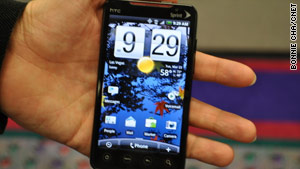
Sprint unveils its first 4G phone
Source: By Kent German, CNET
March 24, 2010 -- Updated 1414 GMT (2214 HKT)

LAS VEGAS, Nevada -- To no one's surprise, Sprint kicked off CTIA 2010 here by announcing its first 4G phone.

The HTC Evo 4G is not only the carrier's first WiMax cell phone--previously the carrier only has offered 4G laptop cards and the Samsung Mondi -- but also the first commercially available 4G handset with a major U.S. carrier.

The Evo runs Google Android OS 2.1; finally, a new Android phone meets the world with the latest Android OS available.

From the outset, the Evo is an attractive touch-screen device that closely resembles the HTC HD2. We got a taste of the Evo's candy bar design when photos of the HTC Supersonic leaked in late January. And in the end, the final product doesn't stray far from those initial impressions.

The massive 4.3-inch display is quite a looker. Its rich resolution and color support make for a pleasant browsing experience.


The touch screen also appeared to be accurate and responsive in our brief hands-on. Below the display are four touch controls for the home screen, main menu, search, and backing out of a page. There's physical navigation control, but that's fine since we rely on the touch screen for most navigation anyway.

Other physical controls include a 3.5mm headset hack, a micro-USB port (yay for both), a power control, and a volume rocker.

The protruding camera lens for the 8.3-megapixel shooter sits in the rear face next to the flash and a VGA lens sits above the display for video calls. We also love the included kickstand.

Other features include Bluetooth, Wi-Fi, 1GB of internal memory, Assisted-GPS with Sprint Navigation, seven home screens, a personal organizer, a microSD card slot that accommodates cards up to 32GB, a 1GHz Snapdragon processor, an HDMI out port, the usual access to Google apps, Sprint TV, messaging, and Outlook Exchange support for contacts and e-mail.

Outlook calendar syncing is not a feature yet, but the usual Gmail syncing is onboard. The Evo also can function as a hot spot for up to eight devices.

Sprint is the only carrier to choose WiMax as its 4G technology, but at least for now it's far ahead of its rivals in 4G availability.

Its network is live in 27 cities, but it will expand the service with partner Clearwire to Miami, St. Louis, Cincinnati, Cleveland, Pittsburgh, Salt Lake City, New York City, Houston, Boston, Washington, D.C., Kansas City, Denver, Minneapolis, and the San Francisco Bay Area by the end of this year.

At that point Sprint says its 4G network will cover 120 million people.

The Evo 4G will be available this summer, but Sprint did not announce pricing details for the handset or its WiMax plans.

-------------------------------------------------------------------------------------------------

This would be nice if we can avail this technology soon...
Read more »

Tuesday, April 6, 2010

Buying a New Notebook Computer

Are you spending most of your computer time on your desktop computer? If that is so, then it’s time to breathe some outside air and still be able to work on your computer. If you are sick of going back to the dark, damp workspace of your desktop, maybe it’s time for you to get a notebook computer.

Getting a new laptop could be your window to the world, as you can bring your laptop wherever you go. Work on anything you want at anyplace. It can also increase your productivity. But how can you find that new notebook that will do all the things you need it to do? Do you need a lot of disk space? Do you really need that high-end graphics processor? There are many places where you can find cheap laptops. There are some things you should look into before buying your first laptop computer.


When looking for a notebook, size would be one of the major factors. Other features you will want to look into are CPU, RAM, hard drive storage, DVD/CD drives, graphic cards and other peripherals. The larger size laptops will usually be faster, more powerful, and have more built in extras.

Many of the notebooks currently on the market comes with Dual core central processors that are a lot faster than single core processors (like the Sempron or the Celeron M) and will allow you to do things faster. If you want an even faster notebook, then you can get a notebook with a Core 2 Duo or even a Quad core CPU, which are more expensive.

Another thing to look for is how much RAM or memory the computer comes with. The more RAM you have, the more things you can do. The average laptop today comes with about 2 or 3 gigabytes of memory. These can be cheaply upgraded if you know where to find a good deal and you know how to install it by yourself.

The other thing you will want to consider is the hard drive storage. You will need plenty of this if you want to store videos or music on your laptop. DVD/CD RW are also needed if you plan on burning CDs or DVDs on the go. Some of the more expensive laptops even come with a Blu-ray player so you can watch high definition movies. If you are planning to use your laptop for heavy gaming, look for a notebook that has a separate, instead of an integrated graphics processor.

Nowadays, it is quite easy to find cheap desktop computers. However, laptop computers are quickly becoming an essential tool in today’s life. If you search in the right places for a good place for discount shopping, you can easily get a laptop that can do most of the things you want for a great price.
Read more »

Wednesday, March 17, 2010

Windows XP users will have to upgrade by next year

Hard-drive changes

Even die hard Windows XP users will have to upgrade next year because their favourite operating system can't handle the new generation of harddrives.

By early 2011 all hard drives that come onto the market will use an "advanced format" that changes how they go about saving the data people store on them. It will mean that hard drive makers can produce bigger drives that use less power and are more reliable. But it will not run on Windows XP which has a hard-drive formatted into blocks 512 bytes in size.

The 512 byte format dates from the days of the floppy and is now hopelessly out of date. David Burks, a product marketing manager for storage firm Seagate said that the fine resolution on hard drives is causing a problem, he said, because of the wasted space associated with each tiny block.

Each 512 byte sector has a marker showing where it begins and an area dedicated to storing error correction codes. In addition a tiny gap has to be left between each sector. In large drives this wasted space where data cannot be stored can take up a significant proportion of the drive, he said.

The new formats use 4K sectors that means about eight times less wasted space but will allow drives to devote twice as much space per block to error correction. Windows XP was released before the 4K format was decided upon while Windows 7, Vista, OS X and versions of the Linux kernel released after September 2009 are all 4K aware.

Although there are emulators for Windows XP being developed they will slow the drive right down.
Read more »

Wednesday, March 10, 2010


Rocket man flies on jet-powered wings

Martin Aircraft Company, in Christchurch, New Zealand, aims to make 500 packs a year which will sell for around £50,000.

The 200 horsepower dual-propeller packs are the brainchild of inventor Glenn Martin who unveiled his machine for the first time in July last year.

Because it weighs less than 254 pounds (115kg) the jet pack does not require a pilot's licence. It is capable of travelling 30 miles in 30 minutes on a full tank of fuel.

And recent tests have seen the newest model reach heights of up to 2,400 metres and top speeds of 60mph.

But only now has sufficient investment been found for the company to begin production of the craft, which will also begin at an undisclosed site outside New Zealand.

Martin Aircraft Company chief executive Richard Lauder said the pack could be perfect for the emergency services, private users and even the military.


He said: "This could be life-saving stuff.

"For us this is an excellent commercial step.

Mr Lauder would not identify the partner other than to say it was an international aircraft company.

The joint venture would be run through a newly created company.

The aircraft company would have a controlling 51 per cent stake. Both Mr Lauder and jet pack inventor Glenn Martin would be directors of the new company.
Read more »

Saturday, February 6, 2010

Five technology trends to watch in 2010

Technology innovation continued its ruthless pace in 2009, despite the economic headwinds. Now it’s time to turn our sights on 2010, where there are going to be some really interesting things to keep an eye on. Let’s count down the five tech trends that should be on your radar for 2010.

5: The consumerization of IT

This is something we’ve been talking about for a couple years but the trend is accelerating. We see it in employees using their own personal laptops and devices for work tasks and using freely available Web tools to help them get their jobs done. This can create a whole host of problems for IT, but in most cases you don’t want to squash it altogether. What you’ll need is a policy that gives employees guidance on how and when these types of tools can and can’t be used, and why.

4: Desktop virtualization

TechRepublic recently asked its CIO Jury about desktop virtualization and 75% said they weren’t interested. However, the 25% that ARE interested are very enthusiastic about using it to cut costs and simplify IT support. In 2010, it’s going to interesting to see if this trend gains momentum and becomes more mainstream, or if it’s simply relegated to a few niche scenarios and industries.

3: E-readers

While most of the buzz around e-readers is centered around consumers readings books and newspapers, there are also a new set of e-readers that will hit the market in 2010 that are aimed at helping businesses streamline the meetings that require huge stacks of paper and bring more multimedia capabilities to business documents. more ammunition on why you should follow this trend, see Jack Wallen’s article “10 reasons why e-readers make sense in the enterprise.”

2: WAN acceleration

I consider WAN acceleration to be one of the best kept secrets in the IT and business worlds. By caching big files and often-used documents, WAN acceleration appliances and software can save big money on bandwidth costs and give your branch offices and remote workers far better performance on their business applications. Companies like Riverbed are even taking WAN acceleration a step further and using it to help speed up hosted cloud applications by partnering with major SaaS providers. All of this makes WAN acceleration one of the hottest projects in IT right now, because it can offer fast ROI and immediate productivity benefits.

1: Berries, apples, and robots

What do these three things have in common? Well, of course, we’re talking about smartphones with BlackBerry, Apple iPhone, and Google Android. These are the three smartphone platforms that have the most momentum heading into 2010. With smartphones becoming standard tools for more and more business workers, it’s going to be
important to watch which devices users gravitate toward, which platforms offer IT more security and manageability features, and which ones developers latch on to as the best place to build new applications for business users.
Read more »

Friday, February 5, 2010

How do Poll Automation in the Philippines Works
With the computerization of the May 2010 elections, voters and election officials will be dealing with new procedures and technology in the casting and counting of votes.

VOTER'S EDUCATION...


After the Supreme Court removed the last hurdle to poll automation in Roque v. Comelec, the computerization of the national and local elections in May 2010 will finally take place. Consequently, the Commission on Elections (Comelec) will be implementing new procedures in the casting of votes and counting of ballots, which would require voters and election officials alike to adjust to these changes by learning how poll automation works.

Basic Feature of the Automated Election System
Under the automated election system (AES) that will be implemented pursuant to Republic Act No. 8436 (Poll Modernization Law), as amended by Republic Act No. 9369, the counting, tally, transmission and consolidation of votes will be done by computers. For this purpose, the Comelec has purchased 82,200 voting machines from the foreign company Smartmatic, which the Comelec calls Precinct Count Optical Scan (PCOS) machines.

The tedious counting process under the manual system, which takes weeks or even months before the results are known, will no longer be used. All votes cast at every precinct will automatically be counted by the PCOS machine at the closing of polls and the results will be transmitted electronically to the appropriate canvassing/consolidation centers, which will be a big departure from the past where the ballots and election returns from every precinct are transported physically to canvassing centers.

The PCOS Technology
The brand of PCOS machine that will be used in the May 2010 elections is the SAES (Smartmatic Auditable Election System) 1800. The SAES 1800 is a type of optical mark reader machine, which is the technology being commonly used in counting the results of computerized examinations, such as the NCEE, where the examinee marks an answer by shading an oval or bubble next to an item in a multiple choice test.

Pre-Election Procedures
To ensure that the PCOS machines are accurate and functioning well, at least three days before election day, the Comelec will conduct a dry run of the PCOS machines by inviting members of the public to accomplish test ballots. These ballots will be counted manually and election returns showing the results will be prepared. Then the same set of ballots will be counted by the PCOS machines and the results will be compared with that of the manual counting. If the results are the same the participants will certify the veracity of the results by signing on the printed elections returns.

The PCOS machines will be delivered to the 80,136 clustered precincts around the country where they will be stored and sealed until election day, which will be the only time when they will be opened and in the presence of the public. During this time the machines will not be connected to any transmission lines to prevent hackers from having access to them. The public, particularly candidates and their representatives, can secure the area where the machines will be stored.

Pre-Voting Procedure
For every voting precinct, there will be a Board of Election Inspectors (BEI) - consisting of a chairman, poll clerk and a third member - that will supervise the elections. Before voting begins, the BEI will initialize the PCOS machine in the presence of the public, usually poll watchers and other election watch groups, and show that the ballot box is empty. Initialization means the BEI will make sure that the machine is zeroed out or there are no votes or entries stored in the machine's memory. An initialization report will thereafter be generated by the machine as proof of this fact.

Paper-Based System
Since voting is done through optical mark reader-type machines, paper ballots will still be used during the voting process. In countries using the direct recording electronic (DRE) machines, voting is done by touching selections on the computer screen, like in touch screen ATMs.

The ballot will contain the names of candidates for every position, and the parties under the party-list system. There are ovals opposite each name and party. The ballot will be used front and back. Considering the number of positions to be filled from the national to the local level, as well as the number of candidates, it is expected that the ballot will be long.

The Voting Process
Voting in an automated election is simple and fast. The procedure is as follows:

Voter's name is verified on the list of registered voters;
Voter is given a ballot, a secrecy folder (to cover voter in making his/her choices) and a pen;
Voter proceeds to a voting booth or spot;
Voter darkens or shades the ovals opposite the names of candidates and parties of his/her choice;
Voter feeds or inserts the completed ballot on the PCOS machine ballot slot (the ballot can be fed to the machine in any orientation: top, bottom or either end);
The machine reads or scans the votes (marked ovals) on both sides of the ballot simultaneously;
The scanned ballot is ejected through the other end of the machine and is dropped on the ballot box; and
Voter returns the secrecy folder and pen to the BEI, his/her right index finger nail is marked with an indelible ink, and affixes his/her thumbmark on the computerized voter list.
Even if the voter fails to completely shade the ovals opposite the candidates of his or her choice, the PCOS machine is designed to still scan such marking. It is, of course, desirable for the voter to completely shade the ovals. Also, the PCOS machine have an LCD screen which will indicate if the ballot is accepted or rejected. This will prevent spoiled votes.

In manual voting, the voter has to write the names of candidates and parties which he or she will vote for. This is time consuming and prone to errors and confusion, such as when a name is misspelled, there are identical names, or the names are confusingly similar. Under the automated system, these problems are immediately resolved as all the voter has to do is mark the names of the candidates of his or her choice, whose names have been pre-printed on the ballot.

Post-Voting Procedure
When the poll closes, the BEI will perform what is called a "close function" by touching the appropriate button on the machine's LCD screen. This will prevent the insertion of additional ballots after voting has ended. After the machine closes the poll at a particualr precinct, it automatically counts all the votes cast and thereafter, an Election Return (ER) will be printed in certain number of copies. The ER is a report on the result of voting in each precinct wherein the total votes cast for each candidate are tallied.

Transmission of Results
After the ERs are printed, the transmission cable is connected to the PCOS machine for the transmission of results from a particular precinct. The results are transmitted by the PCOS machines electronically to the City/Municipal Board of Canvassers (BOC) via canvassing/consolidation machines (CCMs), which will consolidate the results from all precincts within the city or municipality. Results will also be transmitted electronically to the Comelec central office. The same process will take place from the city or municipality to the province, then from the province to Congress and Comelec.


HOW TO USE YOUR MODERN BALLOT...


As can be seen from this process, the PCOS machines will only be online during the transmission of results to minimize the window for hacking the system.

1. Before accepting the ballot from the BEI, check to see if the ballot is:
a. Un-filled up; and
b. Clean, i.e., there are no marks anywhere on the ballot

2. Vote by shading in the oval next to name of the candidate of your choice.
a. COMPLETELY shade in the oval
i. Do not use a check, or an x, or a dot, or any similar mark
ii. Do not make any mark outside the voting areas of the ballot
iii. It is alright to go over or beyond the lines of the voting oval
iv. USE THE COMELEC PROVIDED MARKING PEN
v. DO NOT OVER-VOTE
b. USE ONLY THE COMELEC PROVIDED MARKING PEN
c. Before filling up the ballot, be sure about the choices you are making. You will not be able to erase the marks you’ve already made; there will be no replacement ballot available.

3. After voting, enclose the ballot in the ballot secrecy folder and proceed to the PCOS
a. There may be a line, so join the end of the line
b. DO NOT SHOW YOUR BALLOT TO ANYONE
c. When it’s your turn to cast your ballot at the PCOS, slide your ballot out of the secrecy folder so that only the top portion is exposed.
d. Align this exposed portion to the mouth of the feeder and gently ease the ballot into the PCOS.
e. Release the ballot without removing the ballot secrecy folder.
f. Wait for the PCOS confirmation of your ballot before leaving

4. After casting your vote, return to the BEI for indelible inking.
-------------------------------------------------------------------------------------
References:

Automation of the 2010 National and Local Elections. January 22, 2010.
Smartmatic Automated Election System. January 22, 2010.www.smartmatic.com
http://www.ibanangayon.ph/
Read more »

 
Powered by Blogger